

Meta’s Major Glitch: Lifetime Budget Issues and AI in Ad Creation
Save Your Budget
Meta is currently experiencing a major glitch when it comes to lifetime campaign budgets and spending. Once last year, I had a campaign that spent its entire lifetime budget in one day. This was a campaign that was supposed to use its budget over 30 days. I contacted Meta Support, but the issue seemed to be standalone and didn’t happen again. Perhaps a problem when duplicating an ad I thought. Flash forward to this year, I had two ads spend their entire budget within one hour. This wasn’t a duplication issue as I thought the year prior because one was a new ad built from scratch. I reached out to Meta support and learned that there is a known bug that is causing lifetime budgets to spend aggressively early in the campaign, mostly in the first hour of launching.
So, if you’re launching an ad with a lifetime budget follow these steps.
- Pay attention that first hour it’s live. Refresh the page looking at today’s date to watch for it to start spending. It should start spending 30 minutes to an hour after launch for existing accounts, a brand-new account may take a little longer for review. Look for it to spend anywhere from $3 to $12 an hour after launch. This is relative to a $1,000 budget over a 30-day time period so, if you’re budget is bigger and time frame is shorter it may spend more up front but this gives an idea of what you’re looking for.
- If it starts spending abnormally fast, shut it off at the campaign level and contact Meta Support and say that your budget was beginning to spend erratically within the first hour of launch.
- If you could not catch it in time and your budget did spend fully in an hour contact Meta Support and say that your lifetime budget spent fully one hour after launching. Providing screenshots of the campaign seems to help move things along. They can place a fix on individual ad accounts, so it’s good to ask for them to put the fix on whether you were able to catch it in time or not.
- Create a new campaign that uses daily budget or wait for them to confirm that the fix has been placed on your ad account. Just to note, this fix does work and seems to be holding.
This issue doesn’t seem to be triggered by how you set up the ad, what AI enhancements you turn off or leave on and can start affecting the ad account randomly and at any time. Meta is currently reviewing refunds and credits. They are hesitant to issue them because they did not overspend the budget., it just spent very quickly. Our prediction is that credits will be issued, but most likely it will take weeks for this to happen. I was given an estimate of a 10-week waiting period to see if credits would be given.
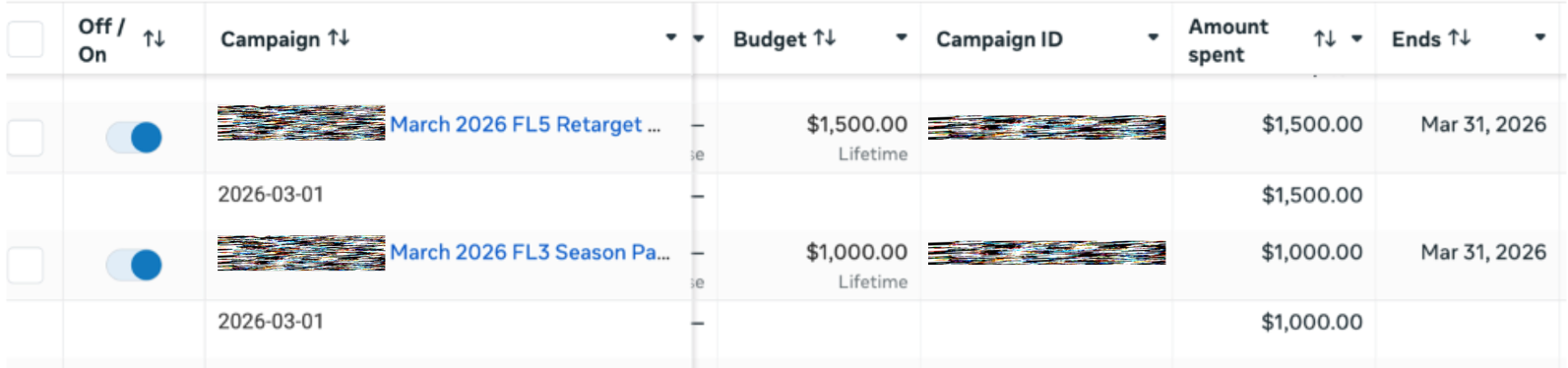
This is an example of the screenshot I provided to them. Showing the entire lifetime budget that was supposed to run until March 31st spent all on 3/1/26.
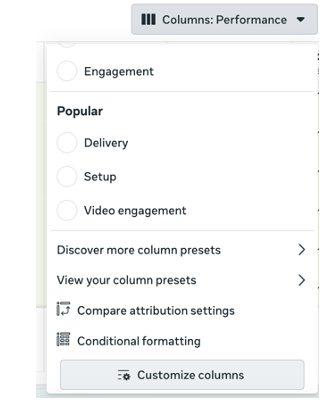
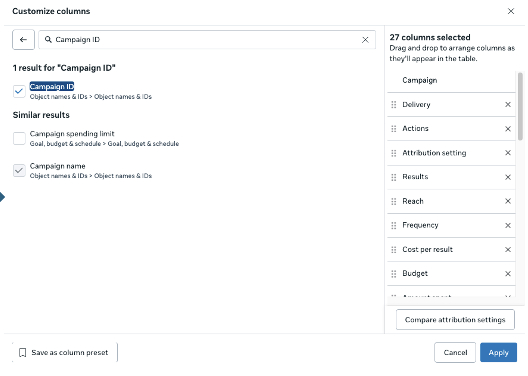
Make sure you know the Campaign ID, you can access this by going to columns- customize columns- search Campaign ID in the box that pops up.
Generally, we recommend lifetime budgets over daily budgets because
- There’s no math to do and it’s harder to overspend
- It lets the algorithm work freely
Because we’re not restricted to say a $20 daily budget, a lifetime budget can enter the learning phase and spend a little more money up front to get to the people who will care about your ad the most. That being said, a daily budget can spend up to 175% of that budget in one day so don’t panic, it will even out over the course of the campaign. So far, I have been using daily budget in a few cases. It doesn’t seem to be impacting traffic or engagement ads, I’m seeing similar impressions, clicks, CPCs and CTRs as lifetime budgeted campaigns. I am however seeing mixed results with the conversion campaigns. One ad is on par with how the other ads are performing and one is significantly below. Mind you the only difference between the campaigns I’ve run before and am running now is the budget type and a few creative swaps. Copy, targeting, AI integrations remain the same. But forgoing a few results to not spend your budget in an hour with no return is worth it at this time. We hope there is a platform wide fix soon.
AI in Ad Creation
Aside from the budget conundrum, Meta is constantly releasing new options within the ad set-up. It’s great to have options, however they are leaning heavily into AI options that are automatically turned on upon creation. These options can overlay or change text, include unwanted photos, etc. Here are just a couple examples that have caused me the most headaches.
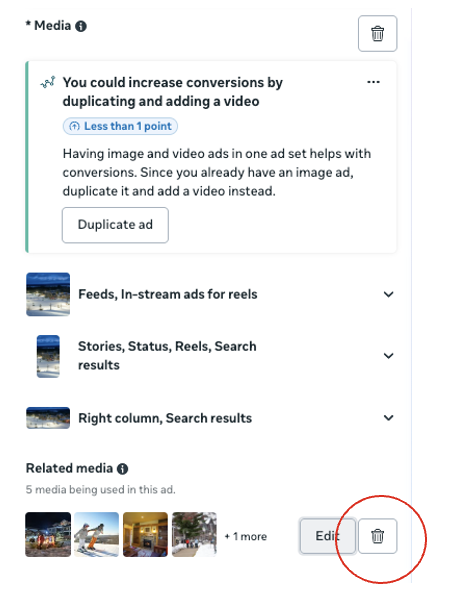
In the ad creative a new related media box has appeared on some of our ad accounts, it automatically is selected after you add in an image and will show other images in the ad account that you’ve used before but might not be relevant for example, on a ski ad, it decided to show fall golf which is not relevant in the slightest. To remove this, hit the trash can and those photos won’t show.
Other text has been automatically included for me these past few months and needs to be manually turned off. Sometimes it appears after writing your primary text or after adding a photo or video and applies itself. Uncheck apply all and you should be good to go.
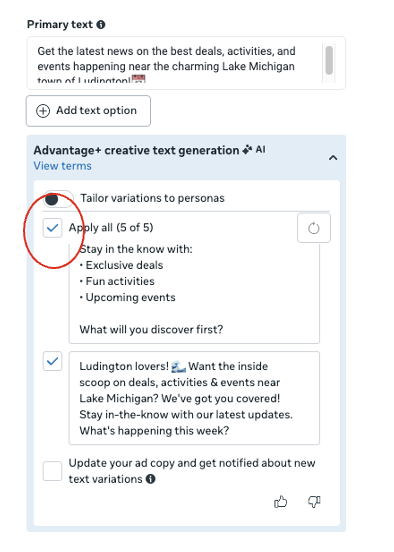
It’s a good idea to check your ads after publishing to make sure you didn’t miss anything or if something mysteriously turned on after creating the ad. Note: if you’re duplicating an ad some of these settings reset and will need to be turned off again.
There’s a lot of positives we’ve seen with AI, we’ve seen improvements in CPCs, CTRs and even engagement rates when enabling select Advantage+ options, more on the targeting side of things. However, every week there is something new somewhere in the ad set up. These are just a few recent ones that stood out but also an extra reminder to pay close attention to every part of the set up and look out after launch for weird occurrences like the budget spend. There will continue to be changes at Meta and we’re working hard to stay on top of it. If it’s getting overwhelming managing by yourself, reach out, we’d be happy to help!

Digital Advertising Strategist